sum(c(2,3))[1] 5Functions are at the core of all tasks in R. Functions are an object that takes an action.
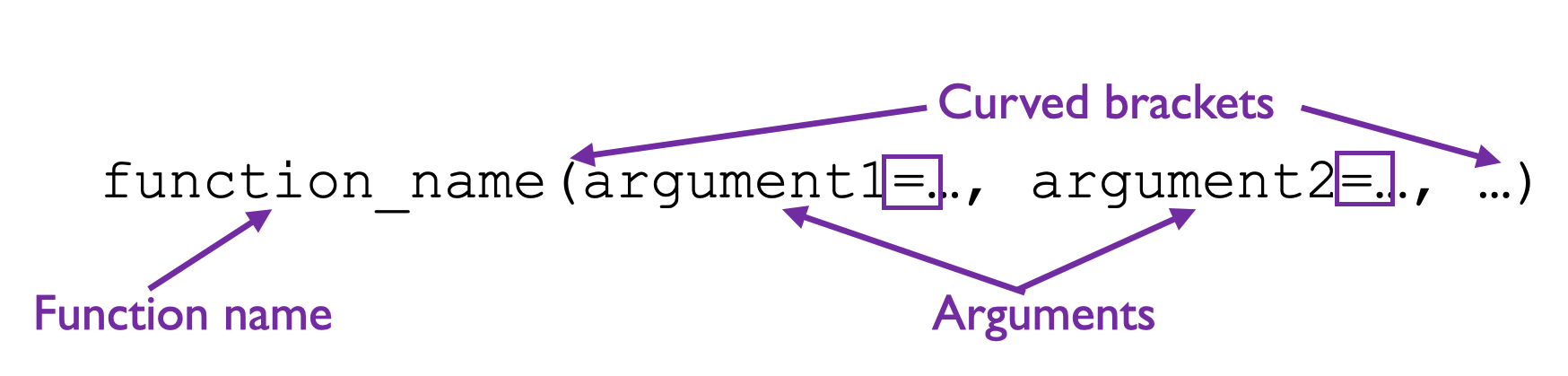
Let’s explore the anatomy of the function using the following example:
sum(c(2,3))[1] 5Parts of a function:
Function name (e.g. sum): This is like the name of your protocol (e.g., “DNA extraction”, “calculate_diversity”). It tells R which operation to perform. Function names are always followed by curved brackets (parentheses) ().
Arguments (e.g. c(2, 3)): These are the inputs you provide to the function. Like the materials you need for a lab protocol: sample size, reagent volumes, temperature settings. Arguments go inside the parentheses ( ). Multiple arguments are separated by commas (,). Arguments can be numbers, data objects, options in the function. Note that arguments will often have a name. You can see the available arguments in the help file.
Output ([1] 5): This is the result the function returns. Like the final measurement from your experiment. [1] means this is the first element of the output The function processed the inputs and gave you 5.
Another example:
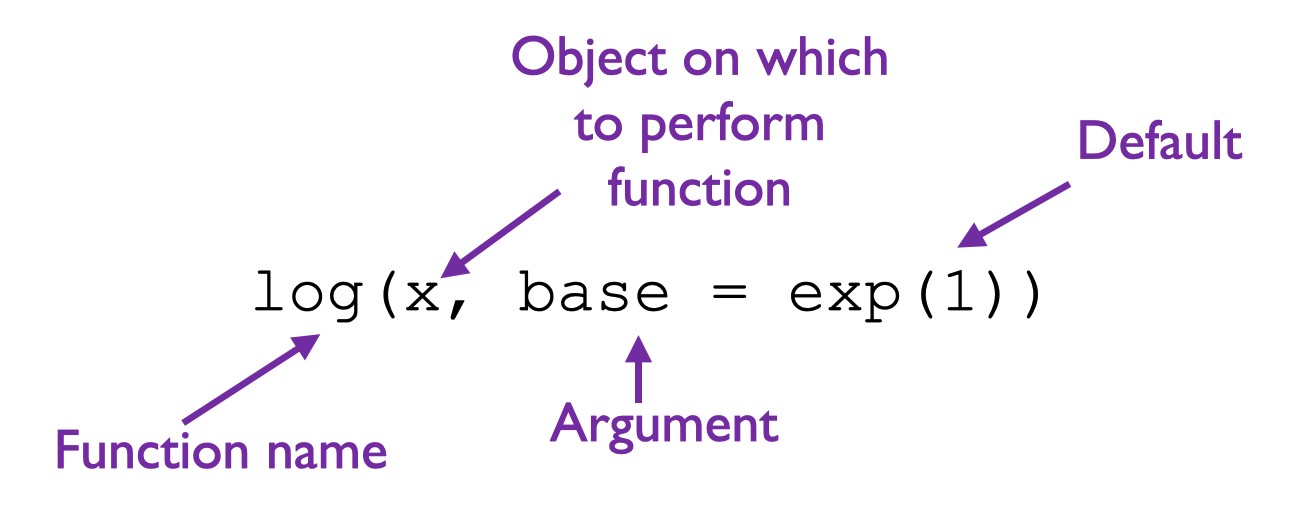
Most functions will take the form described above. Exceptions to this include very common arithmetic operators.
Arithmetic Operators include:
| Operator | Description |
|---|---|
+ |
addition |
- |
subtraction |
* |
multiplication |
/ |
division |
^ |
exponentiation |
sqrt() |
square-root |
abs() |
absolute value |
sin(), cos(), tan() |
trigonometric functions |
exp() |
exponential |
log() |
logarithm (default is base e, see help file for more) |
It is important to remember the order of operations when using arithmetic operators in R.
R will evaluate your code following PEMDAS:
Parentheses > Exponents > Multiplication/Division > Addition/Subtraction
Note: An important feature in R is element-wise operations. When you add two vectors, R adds corresponding elements together:
c(1, 2, 3) + c(4, 5, 6)
c(1 + 4, 2 + 5, 3 + 6)
c(5, 7, 9)
You can also use variables that store vectors:
V1 <- c(1, 2, 3)
V2 <- c(4, 5, 6)
V3 <- V1 + V2
where V3 will then be a vector containing 5, 7, 9.
BE CAREFUL THOUGH: R will allow you to do an element-wise operation even if the two vectors do not match in length. For example:
V4 <- c(1, 2, 3, 4)
print(V4)
[1] 1 2 3 4V5 <- c(1, 2)
print(V5)[1] 1 2V4 + V5[1] 2 4 4 6Notice how the values in V5 were repeated until they matched the length of V4. This is often not what you want. Another reason that it is important to take a look at your objects.
Some functions come “preloaded” with R, while others you will have to load into R when you need them from a package. Think of these as things you can do with a basic game, and those you can do with an “expansion pack”.
Packages consist of collections of functions, etc. that help us accomplish various tasks in R. Currently (d. 26/01/2026), there are 23058 contributed packages available and many others are listed outside this official list.
Installing packages in base R is a 2-step process. First, you need to install the package from the web (you need internet access for this first step). This is done with
install.packages("PackageName")
where PackageName is the name of the package. Note the quotations around the package name! The first step only needs to be done once for a current version of R.
The second step, loading the package, needs to be done each time you have a new R session (open R) and want to use a package (internet access not needed for this 2nd step). Loading the package is done with:
library(PackageName)
Note that there are no quotes on the package name with the library function.
To be added.

